
How do I reset APN settings on my eSIM?
If your phone has signal but the 3G, 4G, LTE or 5G indicator keeps appearing and disappearing, resetting the APN can help restore the mobile-data connection.
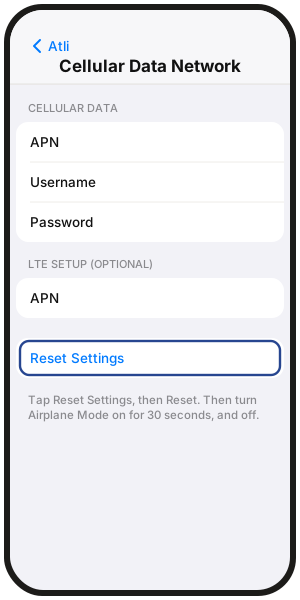
iPhone: Settings › Cellular / Mobile Service › Atli › Cellular Data Network › Reset Settings
What are APN settings?
APN stands for Access Point Name. It tells your phone how to connect to mobile data. These settings are normally configured automatically, so you usually do not need to change them manually.
Why does the 4G or 5G icon keep flashing?
A flashing or unstable 3G, 4G, LTE or 5G indicator can point to a network or APN problem. Resetting the APN is a useful troubleshooting step, but it does not mean the APN is definitely the cause.
How to reset APN settings by device
iPhone
- Go to Settings › Cellular (or Settings › Mobile Service depending on your region).
- Select Atli under SIMs.
- Tap Cellular Data Network (or Mobile Data Network).
- Scroll to the bottom and tap Reset Settings, then tap Reset.
- Turn Airplane Mode on for 30 seconds, then turn it back off to reconnect.
If Cellular Data Network is not shown, your iPhone may not expose APN controls for that line. Skip this step and continue with the connection troubleshooting guide below.
Samsung Galaxy
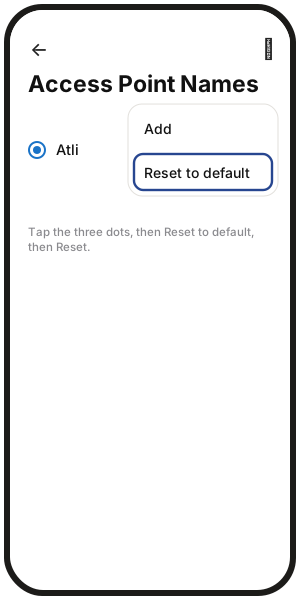
- Go to Settings › Connections › Mobile networks › Access Point Names.
- Select Atli if multiple SIMs are shown.
- Tap the three dots in the upper-right corner.
- Tap Reset to default, then tap Reset.
Google Pixel
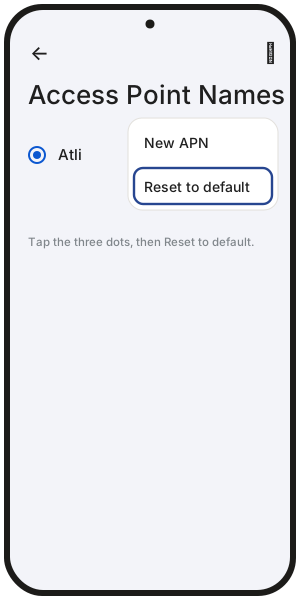
- Go to Settings › Network & internet › SIMs › Atli › Access Point Names.
- Tap the three dots in the upper-right corner.
- Tap Reset to default.
On other Android phones, menu names may vary.
How to set the APN manually on Android
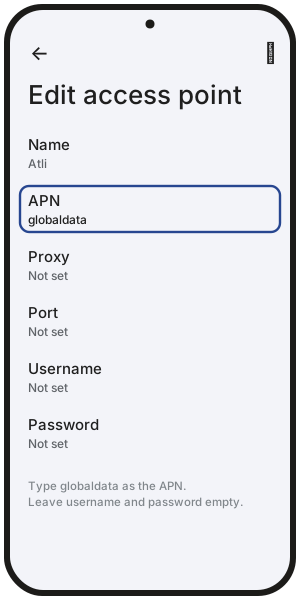
In Bhutan, Brunei, Hong Kong, Macau, Myanmar, South Korea, Sri Lanka and Timor-Leste, Android phones need the APN set manually.
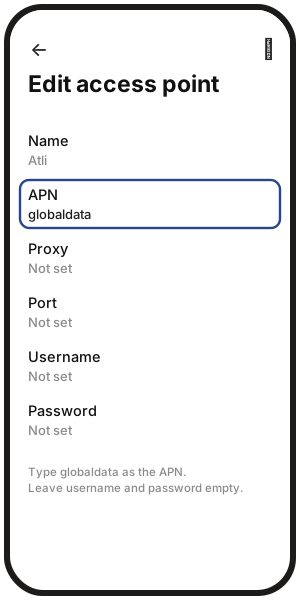
- Open Access Point Names for Atli (see above) and tap + or Add. On some phones, it is under the three dots.
- Set Name to Atli and APN to globaldata. Leave username and password empty.
- Tap the three dots, then Save, and select the new APN. If it won't save or disappears, take out your other SIM card, restart your phone and add it again.
- Turn Airplane Mode on for 30 seconds, then turn it back off.
What if resetting the APN doesn't fix it?
If data still does not work after resetting the APN:
- 1Turn Data Roaming on for Atli.
- 2Make sure Atli is selected as your mobile-data line.
- 3Restart your phone.
- 4Continue with No data or won't connect.
Still stuck after working through the full connection guide? Type Talk to a human in the Atli chat.
FAQ
Can resetting the APN break my own SIM?
No. Resetting the APN for Atli only changes the mobile-data settings for the Atli eSIM.
Do I need to type in APN details manually?
Usually not. Reset the APN to its default settings first. On Android in Bhutan, Brunei, Hong Kong, Macau, Myanmar, South Korea, Sri Lanka and Timor-Leste, set it manually: APN globaldata, username and password empty.
Why don’t I see APN settings on my iPhone?
Some iPhones and network configurations do not show editable APN settings. If the menu is missing, skip the APN reset and continue with No data or won't connect.
Will resetting the APN delete my eSIM?
No. It only restores mobile-data connection settings to their defaults. Your Atli eSIM and remaining data stay intact.