
How do I choose a network manually on my eSIM?
Your phone normally chooses a network automatically. If the connection is weak, slow or not working, you can temporarily select another available network for the Atli eSIM.
Manual selection only works when another supported network is available at your location.
When should I choose a network manually?
By default, your phone chooses a network automatically.
Try manual network selection when:
- your current connection is weak or slow
- you have signal but mobile data is not working
- the phone still shows No Service after the normal arrival checks
Choose a network
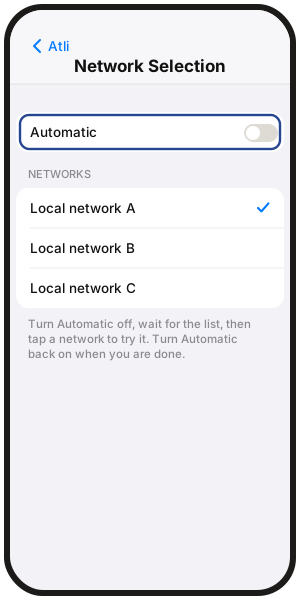
iPhone
Settings › Cellular › Atli › Network Selection
UK: Mobile Data › Atli › Network Selection
- Turn Automatic off.
- Wait for the network list.
- Tap a network to try it.
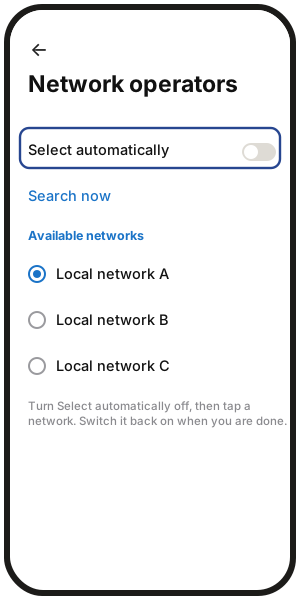
Samsung Galaxy
Settings › Connections › Mobile networks › Network operators
- Select the Atli eSIM if needed.
- Turn Select automatically off.
- Wait for the list, then tap a network.
Google Pixel
Settings › Network & internet › SIMs › Atli
Turn automatic network selection off, wait for the list, and choose a network.
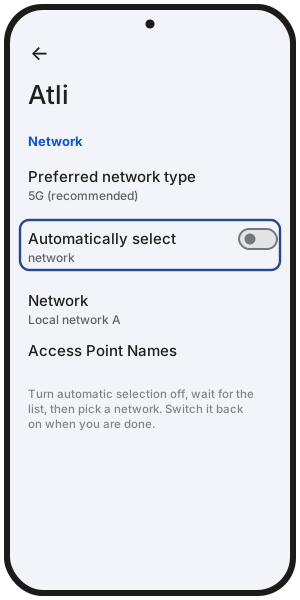
On other Android phones, menu names may differ.
What if the network I choose does not connect?
The list may show networks that Atli cannot use. If the network you choose does not connect, try another one or turn automatic selection back on.
Turn automatic selection back on
When you finish troubleshooting, turn automatic network selection back on in the same settings screen.
Do this before travelling to another destination so your phone can choose an available network there automatically.
If needed, turn Airplane Mode on for 30 seconds, then off again to reconnect.
FAQ
Do I need to choose a network in every destination?
No. Automatic selection should be the normal setting. Use manual selection only when you are troubleshooting the connection.
Why can't I switch to another network?
Another supported network may not be available at your location. If only one usable network is available, leave automatic selection on.
Will a different network be faster?
It can be. Coverage, congestion and available network technology can differ between networks. One network may offer 5G while another uses 4G/LTE. More in Does a travel eSIM support 5G?
What if no network gives me data?
Continue with No data or won't connect. If data still does not work, type Talk to a human in the Atli chat.