
Can I use a hotspot on a travel eSIM?
Yes. Set Atli as your mobile-data line, then turn on your phone’s hotspot. Other devices can connect to it normally.
Hotspot usage comes from the same Atli plan allowance.
Hotspot availability can also depend on the phone and supported network.
Turn on your hotspot
iPhone
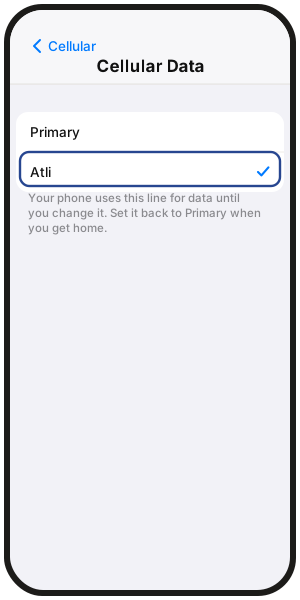
- 1Go to Settings › Cellular › Cellular Data and choose Atli.
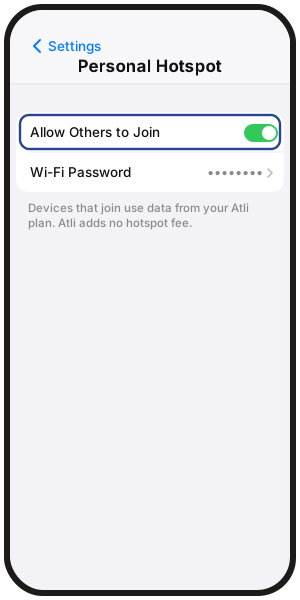
- 2Go to Settings › Personal Hotspot.
- 3Turn on Allow Others to Join.
Your hotspot password appears under Wi-Fi Password.
Samsung Galaxy
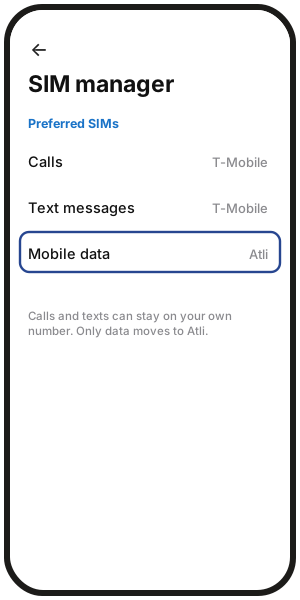
- 1Go to Settings › Connections › SIM manager and set Mobile data to Atli.
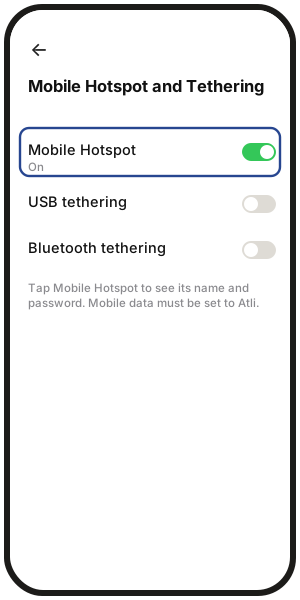
- 2Go to Settings › Connections › Mobile Hotspot and Tethering.
- 3Turn on Mobile Hotspot.
Tap Mobile Hotspot to see the network name and password.
Google Pixel
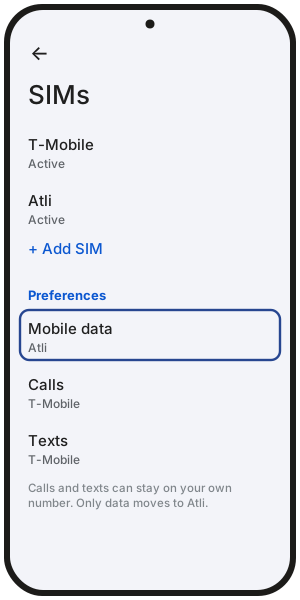
- 1Go to Settings › Network & internet › SIMs and set mobile data to Atli.
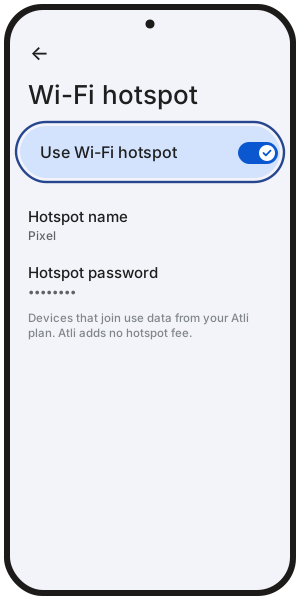
- 2Go to Settings › Network & internet › Hotspot & tethering › Wi-Fi hotspot.
- 3Turn on Wi-Fi hotspot.
Tap the hotspot name or password to view or change it.
On other Android phones, menu names may differ.
Hotspot not working?
- Check the phone itself first. Open a webpage using mobile data. If the phone has no data, the hotspot cannot share it. See Why is my eSIM not working abroad?
- Make sure Atli is the mobile-data line.
- Make sure Data Roaming is on for the Atli eSIM.
- Try another network if the phone is connected but hotspot traffic is blocked.
iPhone hotspot greyed out? Go to Settings › Cellular and make sure Cellular Data is on.
Pixel hotspot not sharing? Turn off Data Saver in Settings › Network & internet › Data Saver.
Still stuck after these checks? Type Talk to a human in Atli.
How much data does hotspot use?
Data used by any device connected to your hotspot comes from the same Atli plan. Large downloads, backups, video and other high-data activity can use the allowance quickly. See Why is my eSIM data going so fast?
Type check data in Atli to see how much data you have used and how much is left.
Does hotspot work on an Unlimited plan?
Yes. On an Unlimited plan, hotspot use counts toward the same 3 GB high-speed allowance for that 24-hour period. After that, speeds are reduced to 3 Mbps until the next daily reset. More in How do unlimited plans work?
Does Atli charge extra for hotspot use?
No. Atli does not charge a separate hotspot fee. Data used by connected devices comes from the same plan allowance.
If your phone is sharing data from your regular SIM instead of Atli, your home carrier’s charges may apply.
FAQ
Can I connect a laptop with a USB cable instead?
If your phone supports USB tethering, traffic shared that way also uses the same mobile-data connection and plan allowance. Connect the phone to your computer, then turn on USB tethering in your phone’s hotspot settings.
How many devices can connect to my hotspot?
The number of devices that can connect at once depends on the phone and its hotspot implementation.
My laptop can't find or join my hotspot. What can I try?
- On iPhone, try Maximize Compatibility.
- On Samsung, try the 2.4 GHz hotspot band.
- Restart the hotspot and reconnect.
What happens when my data runs out?
Connected devices lose internet when your fixed-data plan runs out of data. Buy another plan that covers your current destination. See What happens when my data runs out? for how the next plan works.
Can someone stay on my hotspot after we split up?
No. A connected device must remain within hotspot range of the phone. If another traveller needs their own connection after the group splits up, they need their own plan. You can also gift them an Atli plan.