
Does a travel eSIM support 5G?
Yes, where a supported Atli partner network offers 5G and your phone can use it.
You also need 5G coverage where you are and 5G enabled for the Atli line. If 5G is not available, your phone uses another supported network type.
How do I check if 5G is available?
Network availability depends on the destination and the partner networks available there.
- Search the destination on chat.heyatli.com to see the network information currently shown for it.
- Or enter the destination in Atli on WhatsApp or Telegram.
What decides my speed?
- Network availability: your phone can only use the network types supported by the available Atli partner network.
- Coverage: 5G may be available in one area but not another.
- Network congestion: busy networks can be slower.
- Your phone: the device must support the available network type and bands.
- Your plan: Unlimited plans reduce speed to 3 Mbps after the 3 GB high-speed allowance for that 24-hour period is used. Fixed-data plans do not use the Unlimited plan's 3 GB high-speed allowance per 24-hour period. Actual speeds still depend on the network and local conditions.
Does my phone support 5G?
Check your phone manufacturer's specifications to confirm that your exact model supports 5G. Support can vary by model and market.
To check whether the phone supports eSIM, use the Atli device compatibility checker. eSIM compatibility and 5G compatibility are separate questions: a phone can support eSIM without supporting 5G, and a 5G phone might not support eSIM.
How do I enable 5G?
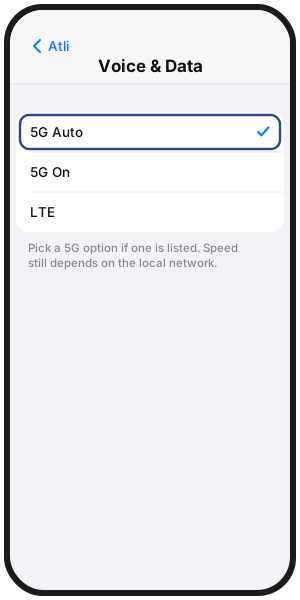
iPhone
- 1Go to Settings › Cellular / Mobile Data › Atli › Voice & Data.
- 2Choose a 5G option if one is available.
Samsung Galaxy
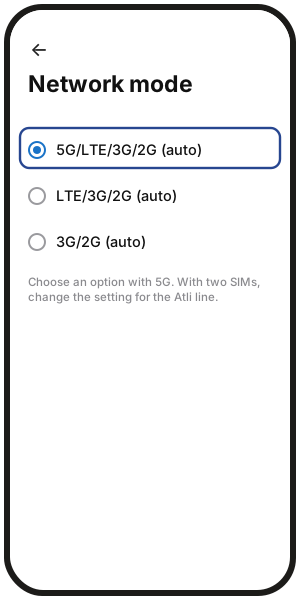
- 1Go to Settings › Connections › Mobile networks › Network mode.
- 2Choose an option that includes 5G. With two SIMs, make sure you are changing the Atli line where per-line settings are available. Menu names can vary by model and software version.
Google Pixel
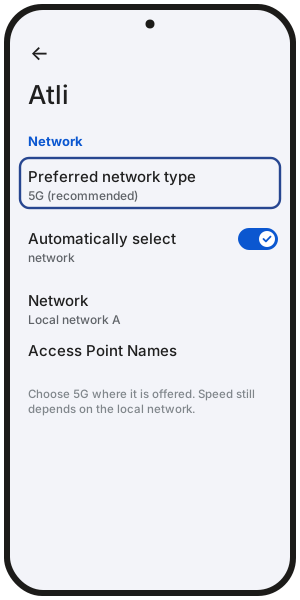
- 1Go to Settings › Network & internet › SIMs › Atli › Preferred network type.
- 2Choose 5G where available. Menu names and options may vary by software version and carrier configuration.
On other Android phones, menu names may vary by manufacturer and software version.
Why doesn't my phone show 5G?
- 5G may not be available on the supported partner network.
- 5G coverage may not reach your current location.
- Your phone or exact model may not support the available 5G network.
- The Atli line may currently be set to another preferred network type.
- The phone may choose 4G/LTE when that connection is more suitable.
If you have signal but data does not load, see Why is my eSIM not working abroad?.
FAQ
Does 5G cost extra with Atli?
No. Atli does not charge a separate fee for using 5G where it is available. Data still comes from the same plan allowance.
Does 5G use more data?
Not automatically. The same activity does not use more data simply because the connection is 5G.
However, some apps may choose higher-quality video, images or downloads on a faster connection, which can increase data use.
Can I switch to a network with 5G?
Possibly. If more than one supported Atli network is available, another network may offer different coverage or network technology.
See Choosing a network manually for the steps.
Does Data Roaming need to be on for 5G?
Yes. Keep Data Roaming on for the Atli eSIM when using Atli, whether the phone connects over 5G, 4G/LTE or another supported network type.
Atli does not charge a separate roaming fee for using your plan in a covered destination.