
eSIM says No Service after landing?
No Service right after landing usually means your phone has not joined a local network yet. Wait 2–3 minutes before changing anything.
Still says No Service?
Try these in order. Check the status bar after each step.
- 1Turn Airplane Mode on for 30 seconds, then off.
- 2Make sure the Atli eSIM is turned on.
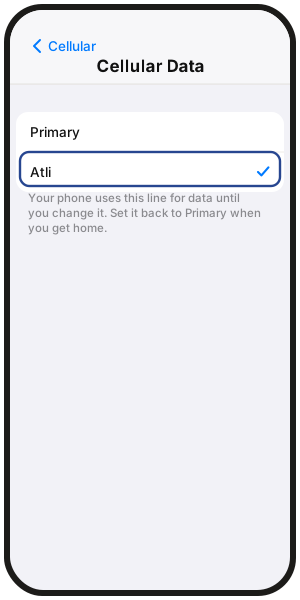
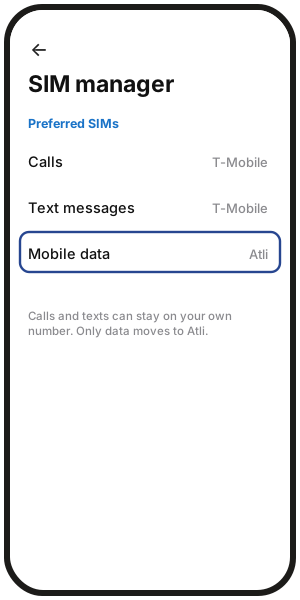
- 3Make sure Atli is your mobile-data line.
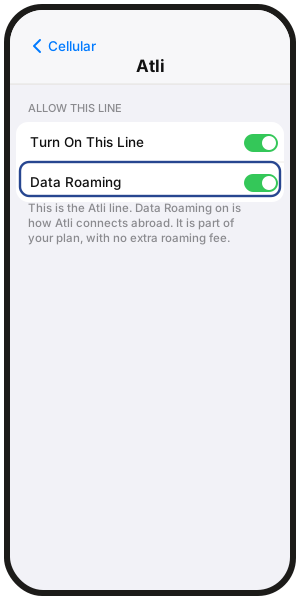
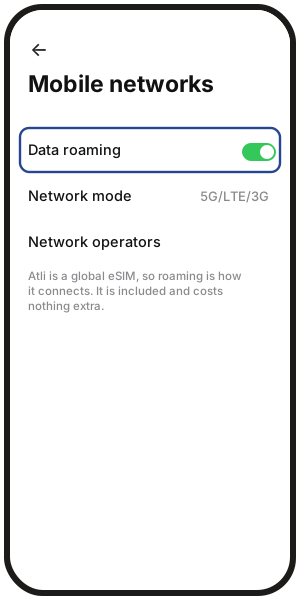
- 4Turn Data Roaming on for Atli.
- 5Check that your plan covers your current destination.
- 6Make sure Date & Time are set automatically.
- 7Try another available network manually. See Choosing a network manually.
- 8Restart the phone.
Where are these settings?
iPhone
- Line on: Settings › Cellular › Atli › Turn On This Line
- Mobile data: Settings › Cellular › Cellular Data › Atli
- Data roaming: Settings › Cellular › Atli › Data Roaming
- Date & time: Settings › General › Date & Time › Set Automatically
Samsung Galaxy
- Line / mobile data: Settings › Connections › SIM manager
- Data roaming: Settings › Connections › Mobile networks › Data roaming
Google Pixel
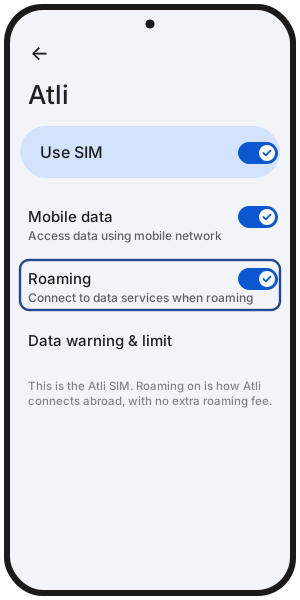
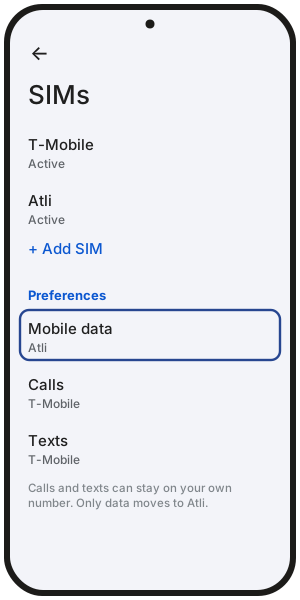
- Line on: Settings › Network & internet › SIMs › Atli › Use SIM
- Mobile data: Settings › Network & internet › SIMs › Mobile data
- Data roaming: Settings › Network & internet › SIMs › Atli › Roaming
On other Android phones, menu names may differ.
Should I delete the eSIM and install it again?
No. Do not delete the Atli eSIM while a plan is on it. Deleting it will not make a network appear.
Already deleted it from the same phone? Type wallet in Atli, open your eSIM, then tap QR / Install and try installing it again.
Does my plan cover this destination?
Connect to Wi-Fi and type wallet in Atli to see your plans.
A local plan works in its destination. A regional plan works in the destinations included in that region. More in where your eSIM works.
No plan for where you are? Buy one for that destination. It goes onto the same Atli eSIM.
Still not working?
If a network name appears but pages still will not load, see Why is my eSIM not working abroad?
If the phone still shows No Service after every step, type Talk to a human in the Atli chat.
FAQ
Has my plan started while it says No Service?
Not if it hasn’t connected yet. Your plan starts when your phone first connects to a supported network at the destination. Buying or installing the eSIM does not start it. More in When does my eSIM plan start?
What does SOS or SOS only mean?
On iPhone, SOS or SOS only means the phone is not connected to its normal mobile network. Emergency calling may still be available.
Can my own SIM charge me while the eSIM connects?
Yes, if Data Roaming is on for your own SIM. Turn it off there to avoid accidental roaming-data charges. Calls and texts on your own number may still cost what your carrier charges abroad.
What should I set up before my next flight?
Install Atli on Wi-Fi before you travel. Keep the Atli line on, choose it for mobile data, turn Data Roaming on for Atli, and turn Data Roaming off on your own SIM. The full steps are in iPhone setup and Android setup.