
Will I be charged for data roaming on an eSIM?
Atli does not charge a separate roaming fee when you use your plan in a destination it covers.
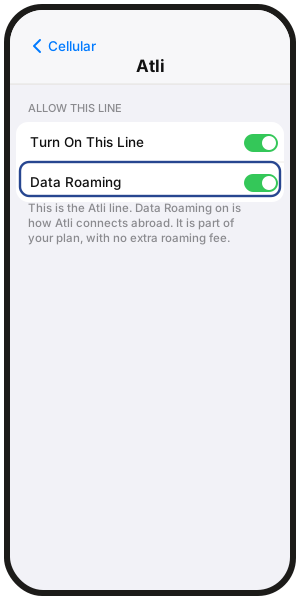
Keep Data Roaming on for the Atli eSIM so it can connect to supported partner networks.
Your own mobile carrier may still charge roaming fees if your own SIM uses data, calls or SMS abroad.
Why does Atli need Data Roaming on?
Atli connects through supported partner networks at your destination. Data Roaming allows the Atli eSIM to use those networks.
If Data Roaming is off for Atli, the phone may show signal while mobile data does not work. See Why is my eSIM not working abroad?.
Does Atli charge roaming fees?
Atli does not add a separate roaming fee when the plan is used in a covered destination.
When a fixed-data plan runs out, Atli does not charge overage fees. Mobile data stops unless another applicable plan is already on the eSIM. See What happens when my data runs out?.
What can my own carrier charge me for?
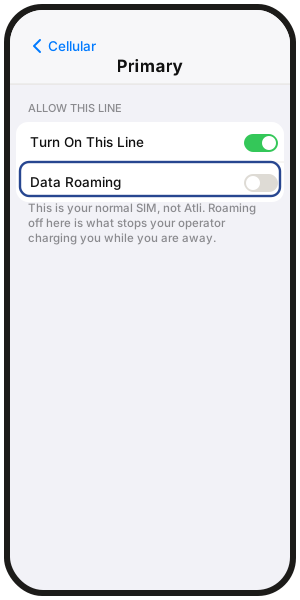
If your own SIM uses mobile data abroad, your carrier may charge its normal roaming rates. Keep Data Roaming off on that SIM if you want to avoid roaming-data charges.
Regular calls and SMS on your own number follow your carrier's roaming rules and rates. Turning Data Roaming off does not stop possible call or SMS charges.
If you want to prevent your own SIM from connecting at all, you can switch that line off. You will not receive regular calls or SMS on it while it is off. See Can you call and text on a data-only eSIM?.
How do I turn Data Roaming on for Atli?
iPhone
- 1Select Atli as the mobile-data line.
- 2Open the Atli line.
- 3Turn Data Roaming on.
- 4Keep Data Roaming off on your own SIM if you want to avoid roaming-data charges.
Samsung Galaxy
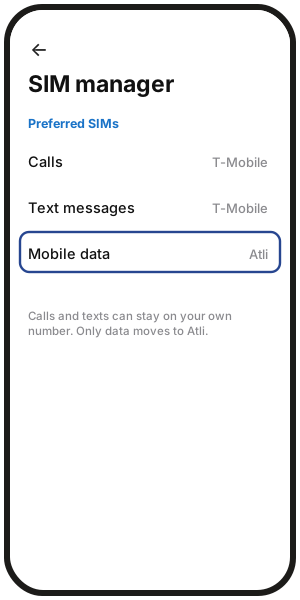
- 1Set Mobile data to Atli.
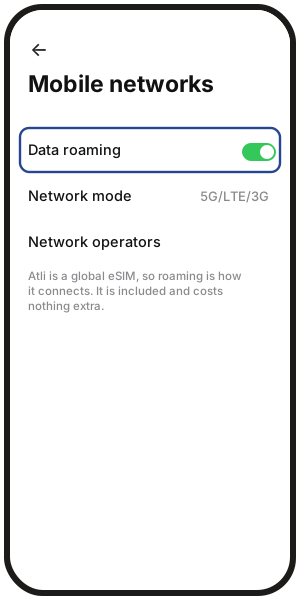
- 2Turn Data roaming on for Atli where per-line controls are available.
- 3Keep roaming off on your own SIM if you want to avoid carrier data charges.
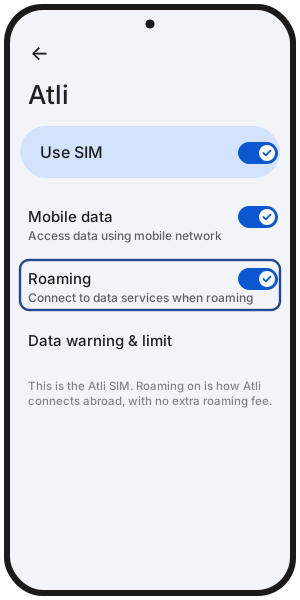
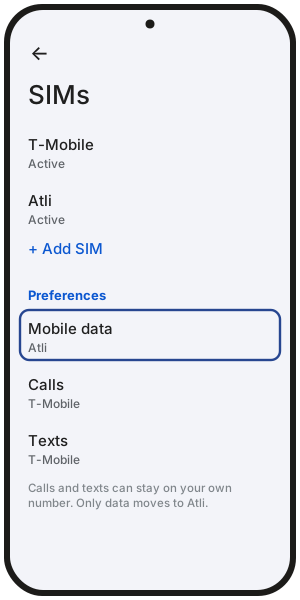
Google Pixel
- 1Open the Atli SIM settings.
- 2Turn Roaming on.
- 3Set Mobile data to Atli.
- 4Keep roaming off on your own SIM if desired.
On other Android phones, menu names may vary.
Some phones have one data roaming switch for both lines. If yours does, turn it on, keep mobile data set to Atli, and turn off automatic data switching so your own SIM is not used for data.
FAQ
Apple, Samsung and Google warn that roaming can cost extra. Does that apply to Atli?
Those warnings are general. Atli does not add a separate roaming fee when your plan is used in a covered destination.
Your own carrier can still charge roaming fees on your own SIM.
Is roaming included when I cross into another destination?
Yes, if the new destination is covered by your plan. Atli does not add a separate roaming fee there.
If the destination is not covered, that plan does not provide data. See Where does my eSIM work?.
What should I change when I get home?
Set mobile data back to your own SIM and turn the Atli eSIM off until you need it again.
Can my own SIM be charged for roaming on a cruise?
Yes. Your own SIM may connect to an onboard maritime mobile network, and your carrier may charge maritime roaming rates.
During days at sea, switch your own SIM off or use Airplane Mode if you want to prevent it from connecting to mobile networks. See Does an eSIM work on a cruise?.