
Can’t activate your eSIM?
If Atli will not install, start by checking your internet connection, eSIM compatibility and carrier-lock status. Also check whether the Atli eSIM is already installed before trying again.
If Atli already appears in your phone's SIM settings, do not reinstall it.
Try these checks first
- 1Connect to stable Wi-Fi. Your phone needs an internet connection to download the eSIM profile.
- 2Check that your phone supports eSIM. Check your exact model in the eSIM compatibility guide.
- 3Check that the phone is carrier-unlocked. A carrier-locked phone may not accept an eSIM from another provider.
- 4Turn off any VPN temporarily. If a VPN is active, turn it off temporarily while installing and try again.
- 5Update the phone. Install any available system updates, then try again.
- 6Make sure Airplane Mode is off.
Need the installation steps? See Install your eSIM.
Is the Atli eSIM already installed?
If an Atli line already appears in your phone's SIM settings, the eSIM is installed. Do not try to install it again.
iPhone
Settings › Cellular (UK: Settings › Mobile Data).
If Atli is listed but turned off, turn the line on.
Samsung Galaxy
Settings › Connections › SIM manager.
Google Pixel
Settings › Network & internet › SIMs.
Check carrier-lock status
iPhone: Settings › General › About. If Carrier Lock (UK: Network Provider Lock) says No SIM restrictions, the iPhone is unlocked.
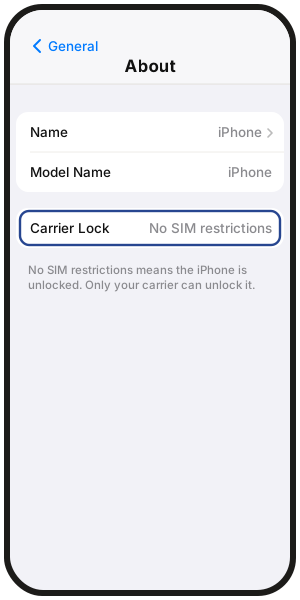
Android: Carrier-lock checks vary by manufacturer and carrier. If you are unsure, ask the carrier that sold you the phone.
Only your carrier can remove a carrier lock.
What does the error message mean?
eSIM not supported or not compatible: This can happen if the phone does not support eSIM, is carrier-locked, or the device variant has regional or carrier restrictions. Check your exact device in the eSIM compatibility guide and confirm that the phone is unlocked.
Can't activate or can't add eSIM: First check whether an Atli eSIM is already listed in your phone's SIM settings. If it is, do not install it again. If Atli is not listed, note the exact error message and continue with the troubleshooting steps below.
Installed but not connecting yet?
If you bought a plan for another destination, the Atli eSIM may show no service before you arrive. That does not mean the installation failed.
The plan starts when your phone first connects to a supported network in a destination the plan covers. Buying or installing the eSIM does not start it. More in When does my eSIM plan start?
Still seeing No Service after you arrive? See No Service after landing.
Still can't install it?
- 1Turn Airplane Mode on for 30 seconds, then off.
- 2Restart the phone.
- 3Check again whether Atli already appears in the SIM settings.
Still stuck? Type Talk to a human in the Atli chat and include the exact error message.
In the Atli app, tap the chat button at the top.
FAQ
Should I enter a phone number or convert my own SIM during setup?
No. Atli is data-only and does not have a phone number. You also do not need to convert your own SIM to eSIM to use Atli.
I deleted the eSIM after a failed install. What should I do?
If you deleted Atli from the same phone, type wallet in Atli, open your eSIM, then tap QR / Install and try installing it again. If the reinstall still fails after the checks on this page, type Talk to a human in Atli and include the exact error message.
Do not delete an installed Atli eSIM while a plan is on it.
Can I get a refund if my phone is locked or doesn't support eSIM?
Refund eligibility depends on the reason the eSIM could not be used. See Payments and refunds for the current policy.
Where do I find my iPhone's EID?
Go to Settings › General › About. For model compatibility details and where to check your phone, see the eSIM compatibility guide.