
Why is my eSIM not working abroad?
If your Atli eSIM has signal but no internet, work through these fixes in order. Test the connection after each one.
Seeing “No Service” instead? See “No Service” after landing.
To test Atli, turn Wi-Fi off temporarily and open a webpage. Turning Wi-Fi off is only for testing; it is not required for normal Atli use.
Try these fixes first
- 1Check your plan. Make sure you have an active plan that covers your current destination.
- 2Check your signal. Weak coverage can stop mobile data even when a network name appears.
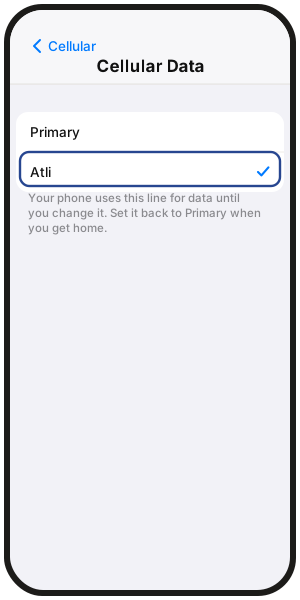
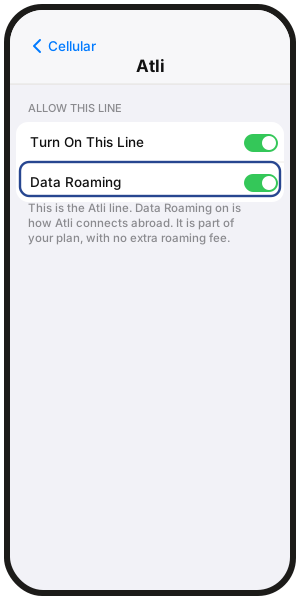
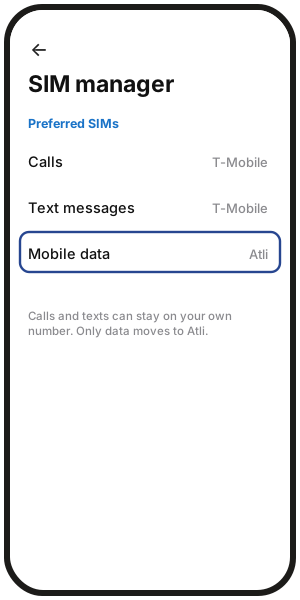
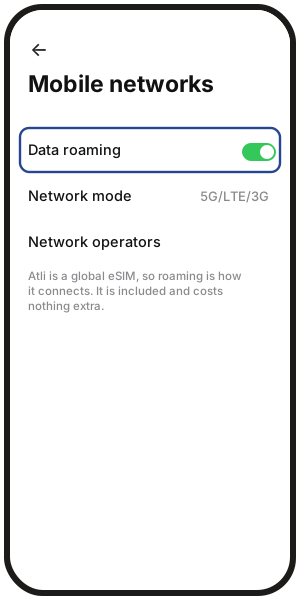
- 3Check the two important settings. Atli must be your mobile-data line, and Data Roaming must be on for Atli.
- 4Turn Airplane Mode on for 30 seconds, then off.
- 5Try another available network.
Check the two important settings
iPhone
- Mobile data: Settings › Cellular (UK: Mobile Data) › Cellular Data › Atli
- Atli line on: Settings › Cellular (UK: Mobile Data) › Atli › Turn On This Line
- Data roaming: Settings › Cellular (UK: Mobile Data) › Atli › Data Roaming
Samsung Galaxy
- Mobile data: Settings › Connections › SIM manager › Mobile data › Atli
- Data roaming: Settings › Connections › Mobile networks › Data roaming
Google Pixel
- Mobile data: Settings › Network & internet › SIMs › Mobile data › Atli
- Atli line on: Settings › Network & internet › SIMs › Atli › Use SIM
- Data roaming: Settings › Network & internet › SIMs › Atli › Roaming
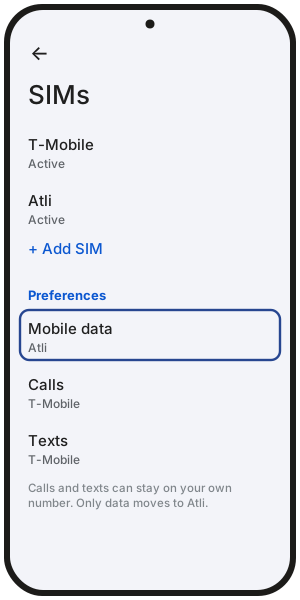
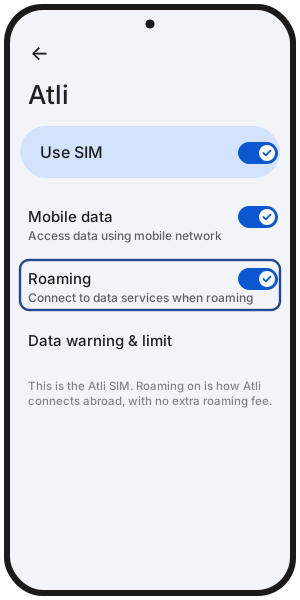
On other Android phones, menu names may differ.
Check your plan
Type check data in Atli on WhatsApp or Telegram to see your plan, remaining data and expiry.
Make sure the plan covers the destination you are currently in. See where your eSIM works. If another plan for the same destination is already on your Atli eSIM, it can take over when the current plan runs out.
Try another network
The network your phone chose may be congested or unavailable. Try another supported network manually. See choosing a network manually.
Still have signal but no data?
If signal is present but data still will not load, the local network or APN settings may need checking. See how to reset APN settings for Atli.
Should I delete the eSIM and install it again?
No. Do not delete the Atli eSIM while a plan is on it. Deleting it will not fix a data connection.
Already deleted it from the same phone? Type wallet in Atli, open your eSIM, then tap QR / Install and try installing it again.
Reinstall not working? See Can’t activate your eSIM.
Still no data?
If you have worked through every step and data still will not load, restart the phone once more and test again with Wi-Fi off temporarily.
Still no data? Type Talk to a human in the Atli chat.
FAQ
My phone says No Service. Is that the same problem?
No. No Service means the phone has not joined a mobile network. See “No Service” after landing.
The 4G or 5G icon keeps flashing and nothing loads. What does that mean?
It can point to a network or APN problem. Try another available network first, then check the APN steps if data still does not work.
Should I restart my phone?
Yes, if the Airplane Mode reset did not help. Restarting can force the phone to reconnect to the network.
My data works but is very slow. Why?
On an Unlimited plan, you get 3 GB of high-speed data in each 24-hour period, then speeds are reduced to 3 Mbps until the next reset. The 3 GB resets every 24 hours from when the plan started.
Fixed-data plans do not use this daily high-speed allowance. Slow speeds can also come from local network congestion, so trying another available network may help.