
Can I use a travel eSIM with my own SIM?
Yes, if your phone supports Dual SIM. Your own SIM can stay active for your phone number, calls and texts while Atli handles mobile data.
For travel, set Atli as your mobile-data line, turn Data Roaming on for Atli, and keep Data Roaming off on your own SIM to avoid accidental roaming-data charges.
Does my phone support Dual SIM?
Dual SIM support depends on the exact phone model and regional version. Some phones use a physical SIM plus eSIM, while others can use two eSIMs.
Check your exact model in the eSIM compatibility guide.
Set Atli as your mobile-data line
Choose Atli for mobile data.
iPhone
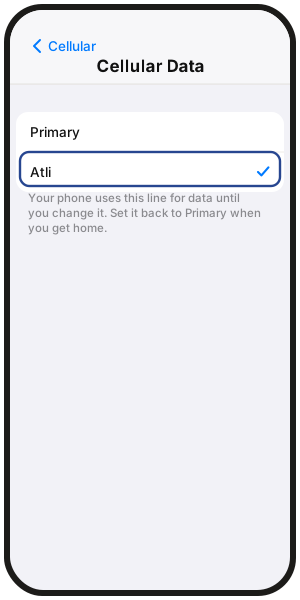
- Settings › Cellular › Cellular Data › Atli
- UK: Mobile Data › Mobile Data › Atli
Samsung Galaxy
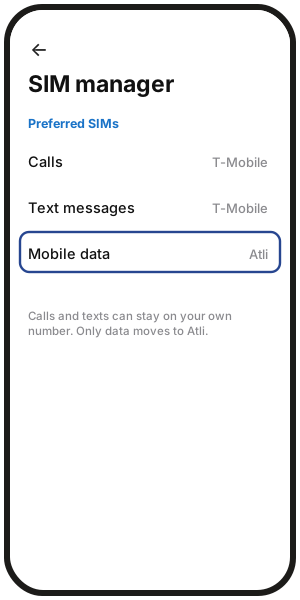
- Settings › Connections › SIM manager › Mobile data › Atli
Google Pixel
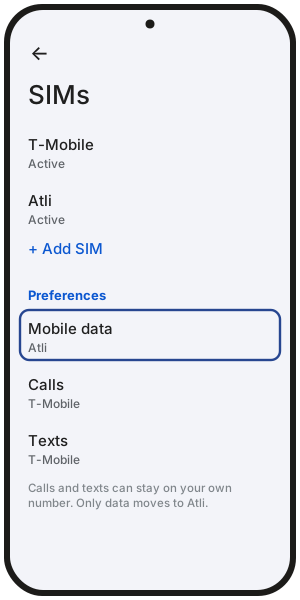
- Settings › Network & internet › SIMs › Mobile data › Atli
More on turning Data Roaming on or off in Data roaming on an eSIM.
Keep calls and texts on your own SIM
Your own SIM can remain the default line for calls and texts while Atli handles mobile data.
iPhone
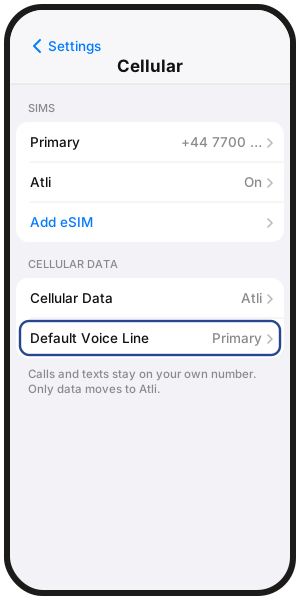
- Settings › Cellular › Default Voice Line, then choose your own SIM.
Samsung Galaxy
- Settings › Connections › SIM manager, then set Calls and Text messages to your own SIM.
Google Pixel
- Settings › Network & internet › SIMs, then set Calls and Texts to your own SIM.
Calls and texts on your own number are charged according to your home carrier's roaming rates. More in Can you call and text on a data-only eSIM?
Turn a SIM line on or off
iPhone
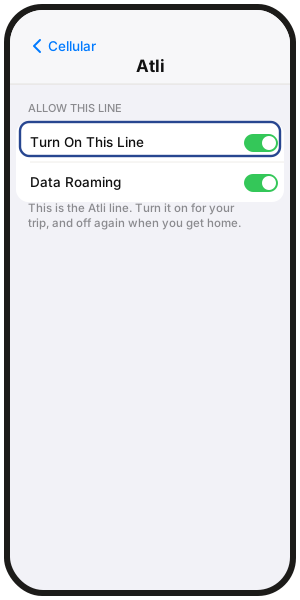
- Settings › Cellular, tap the line under SIMs, then switch Turn On This Line on or off.
Samsung Galaxy
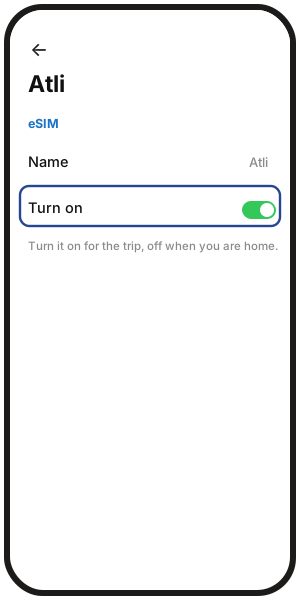
- Settings › Connections › SIM manager, tap the SIM, then tap its switch.
Google Pixel
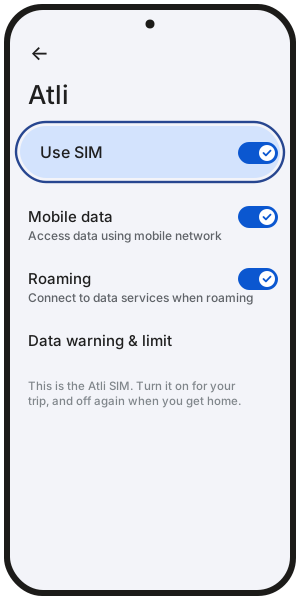
- Settings › Network & internet › SIMs, tap the SIM, then switch Use SIM on or off.
You can turn your own SIM off if you do not need calls or texts during the trip. Apps such as WhatsApp can continue using Atli data.
If WhatsApp asks you to verify your number again, you may need access to your own SIM. More in Will I keep my WhatsApp number with a travel eSIM?
When you return home, turn your own line back on and switch mobile data back to it.
FAQ
Do I need to take my SIM card out?
No. If your phone supports Dual SIM, your own SIM can stay in the phone while you use Atli.
Should I convert my physical SIM to an eSIM first?
No. You do not need to convert your own SIM to use Atli. Your own SIM and the Atli eSIM are separate.
How do I tell the two lines apart?
Give each line a clear label, such as Home and Atli.
On iPhone, go to Settings › Cellular, tap the line, then tap Cellular Plan Label (UK: Mobile Plan Label). On Samsung, go to Settings › Connections › SIM manager, tap the SIM, then Name.
What does the Turn On Travel eSIM message on iPhone mean?
On supported iOS versions, iPhone may show this prompt upon arrival. Choosing Travel eSIM and Current eSIM can keep your own line active for calls and texts while Atli handles mobile data. Your home carrier may still charge for calls, texts, or roaming services on your own line.
Will my iPhone switch back to my own SIM at home?
iPhone may offer to switch back to your own line when you return. If it does not, turn your own line on and select it again for mobile data in Settings.
What does Allow Cellular Data Switching do on iPhone?
It allows the iPhone to switch which line provides cellular data in some situations. If you want to keep travel data on Atli, you can leave it off.
If you turn it on, keep Data Roaming off on your own SIM to reduce the risk of roaming-data charges from your carrier.